Smart grocery planning inside GlycoDiet

Shopping list for your Mediterranean meal plan.

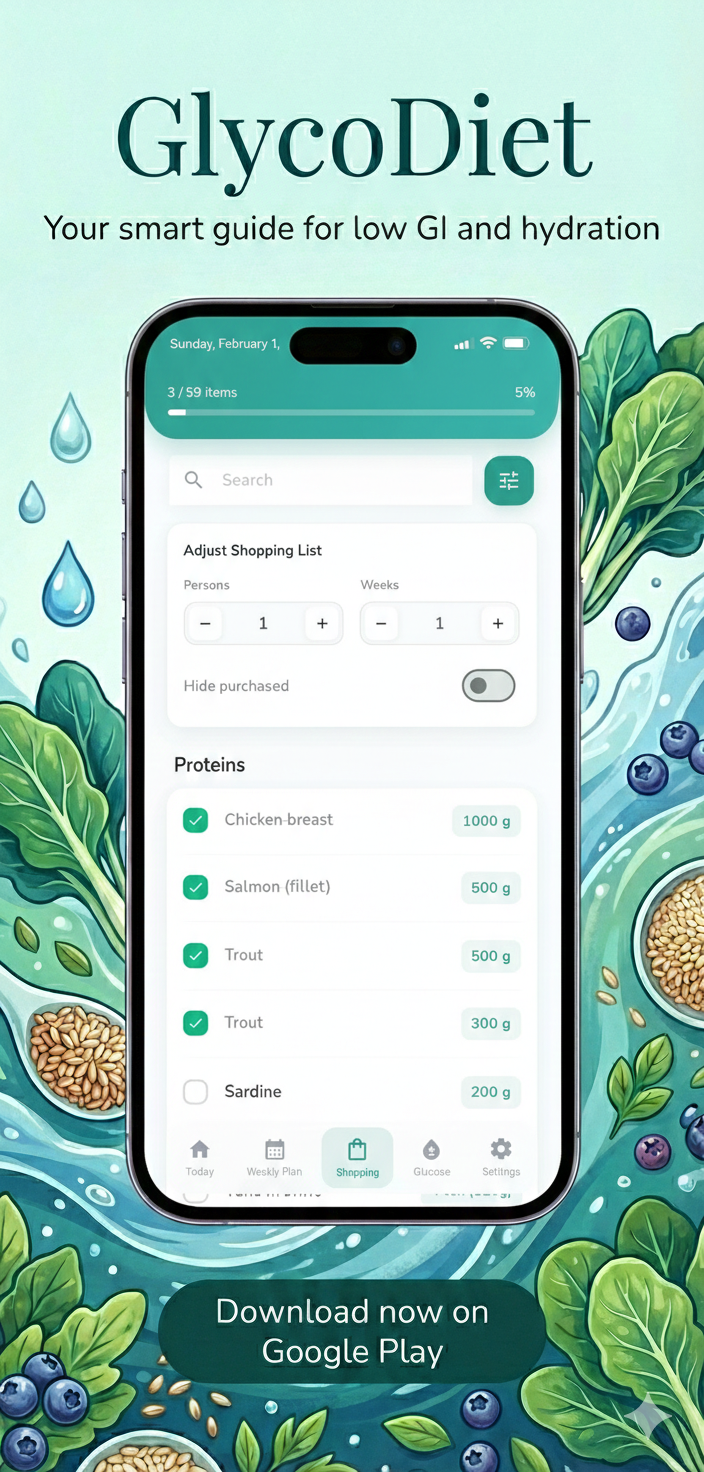
GlycoDiet turns selected weekly meal plans into practical grocery lists. Users can prepare ingredients, check off purchased items and keep their shopping progress saved after leaving the app.
Auto Generated from meal plans
Saved Checked purchased items
Weekly Grocery preparation
GlycoDiet shopping list generated from Mediterranean meal plans

Plan meals, then prepare groceries The shopping list helps make weekly meal planning easier to turn into action.

How it works

From weekly meal plan to organized grocery shopping.

GlycoDiet connects meal planning with grocery preparation, so users can spend less time rewriting ingredients and more time following the plan.

01

Choose a meal plan

Start with one of the GlycoDiet Mediterranean weekly plans: 1300, 1500 or 1700 kcal.

02

Generate groceries

The app creates a shopping list based on the meals and ingredients from the selected plan.

03

Check off purchased items

As groceries are purchased, users can mark items as completed directly in the list.

04

Keep progress saved

Checked items stay saved after leaving or restarting the app, making weekly preparation easier to continue.

A shopping list that follows your meal plan.

The goal is simple: connect planned meals, ingredients and grocery preparation in one practical flow.

View meal plans

Shopping list features

Designed to make weekly grocery preparation easier.

The GlycoDiet shopping list is built around real weekly planning: generate groceries from a meal plan, mark what is purchased and continue where you left off.

01

Generated from meal plans

The list is created from the selected Mediterranean meal plan, so users do not need to manually rewrite ingredients.

02

Checked items stay saved

Purchased groceries can stay checked after leaving or restarting the app, making the list easier to continue later.

03

Mark all and unmark all

Users can quickly mark all visible items as purchased or clear the list when they want to start again.

04

Useful for weekly planning

The shopping list helps connect 7-day meal plans with grocery preparation before the week begins.

05

Works with calorie plans

Whether the user follows the 1300, 1500 or 1700 kcal plan, the shopping list supports the selected routine.

06

Less last-minute guessing

With groceries connected to the meal plan, users can prepare with more structure and fewer last-minute decisions.

The shopping list is part of the full GlycoDiet routine.

It works together with Mediterranean meal plans, calorie guidance, meal details and glucose records to support a clearer weekly flow.

Download on Google Play
GlycoDiet shopping list screen with grocery items from a meal plan

Groceries organized from your plan A selected weekly menu becomes a practical list for grocery preparation.

Connected with meal plans

Your shopping list starts with the meals you plan to follow.

GlycoDiet is not only a grocery checklist. It connects ingredients with the selected Mediterranean meal plan, which makes the shopping list more useful for real weekly preparation.

  • Pick a 7-day plan Choose the 1300, 1500 or 1700 kcal Mediterranean meal plan inside the app.
  • Prepare ingredients Use the generated shopping list before the week starts or while shopping.
  • Continue later Checked purchased items remain saved, so the list can be continued after leaving the app.

Shopping list FAQ

Common questions about grocery planning in GlycoDiet.

Here are the most important things to know about the GlycoDiet shopping list and how it connects with weekly meal plans.

What does the GlycoDiet shopping list do?

The shopping list helps users prepare groceries from the selected Mediterranean weekly meal plan, so ingredients are easier to organize before or during shopping.

Is the shopping list created automatically?

Yes. GlycoDiet generates grocery items from the selected meal plan, reducing the need to manually rewrite ingredients from individual meals.

View Mediterranean meal plans
Does the app remember checked purchased items?

Yes. Checked purchased items stay saved after leaving or restarting the app, so users can continue grocery preparation later.

Can I mark all items at once?

Yes. The shopping list includes options to mark all visible items or unmark them when users want to reset the list.

Does the shopping list work with all calorie plans?

Yes. The shopping list supports GlycoDiet meal plans across the available 1300, 1500 and 1700 kcal options.

Learn about calorie plan selection

Prepare your week with less friction

Use GlycoDiet to turn meal plans into grocery preparation.

Download GlycoDiet to follow Mediterranean weekly meal plans, generate shopping lists, save checked purchased items, estimate daily calories and keep glucose records.

GlycoDiet shopping list app preview